UNDA.Xplora

Learn electronics risk-free.
Grow into a maker.

Xplora makes hardware easy to learn: start safely in 3D, then build it for real. One path, from your first LED to your own projects.

Try Xplora3D free

WHY XPLORA

Great kits exist.
Getting started still hurts.

For a first-timer, hardware is overwhelming, and one small mistake you didn't know you were making can mean buying the parts all over again.

BEGINNERS · CURIOUS MINDSTP1

Starting out

  • A dev kit arrives, and you still need parts just to blink an LED
  • Drivers and software to set up before your first line of code
  • Huge online projects, and no idea where to begin
  • One wrong wire, and you're paying for parts again
With Xplora

Learn in 3D first, where mistakes cost nothing and are easy to fix. Move to the kit when you're ready.

MAKERS · EDUCATORSTP2

Tinkering and teaching

  • Buying parts just to try one idea
  • Finding a kit simple enough for a whole class
  • Sharing what you know with someone brand new
  • Nowhere safe to experiment, so every mistake costs real parts
With Xplora

Experiment risk-free in Xplora3D, try any part in seconds, and give learners one clear path from the screen to a real board.

That's why we're building Xplora: so your first projects, and the hard ones after, never feel overwhelming.

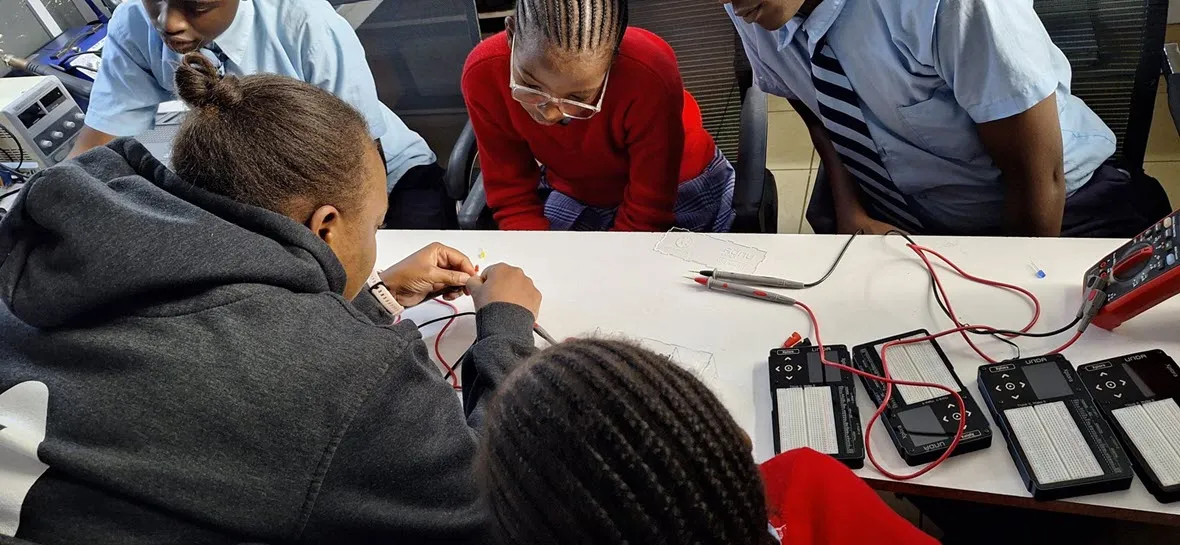
An educator and students wiring circuits together at a bench of UNDA Xplora kits
In the classroom · first circuits on UNDA.Xplora kits

HOW IT WORKS

Build it here first.
Then wire it for real.

Every part on the real board exists in the simulator, in the same place. Try a circuit safely in Xplora3D, then send it to the kit with Xplora Bridge.

1Xplora3DSimulate it
2XploraWire it for real

THE LINEUP

Start in 3D. Grow into hardware.

The Xplora line by UNDA: a simulator and three boards that share the same parts, the same code and the same projects. Start on any of them.

U1XPL-3D

UNDA.Xplora3D

The 3D circuit simulator, right in your browser.

Key features

  • 50+ virtual parts
  • Blocks, then MicroPython
  • Lessons that check your work

ABS. MAX Mistakes: unlimited, free

U2XPL-MICRO

UNDA.XploraMicro

A pocket board for first real projects. (placeholder)

Key features

  • Fits in a pencil case
  • USB-C, no drivers
  • Runs Xplora3D projects

ABS. MAX Pocket size: one

Take the tour
U3XPL-KIT-01

UNDA.Xplora

The pocket circuit lab. Xplora3D included.

Key features

  • 400-point breadboard + MCU
  • Display and touch navigation
  • Works with no computer

ABS. MAX Makers-50: first 50 boards

Ships the first week of December

Take the tour
U4XPL-PRO

UNDA.XploraPro

For advanced makers and classrooms. (placeholder)

Key features

  • More I/O, more power
  • Snap-on modules
  • Classroom ready

ABS. MAX Ceiling: none

Take the tour

THE HARDWARE

Take a tour of the UNDA.Xplora

THE SOFTWARE

One Firmware. Every UNDA.Xplora board.

Xplora, XploraMicro and XploraPro run the same firmware, UI and OS, so everything here works on all of them.

IN ACTION

Still curious? Watch it all come together.

FOUNDING PATRONS

Your number,
etched in silicon.

The first 500 Xplora3D buyers become the Xplora-500. The first 50 kit buyers become the Makers-50. Every patron gets their own numbered chip, forever.

Latest patrons

MADE BY PHINALABS

Three engineers. Ten years of shipping hardware.

Two mechatronics engineers and an electronics engineer design, test and build every Xplora board in-house. Xplora grew out of our classroom research in Kenya, presented at IST-Africa 2025 and published by IEEE.